"I spent £2,000 on 360 booth equipment and it's still a nightmare to run."

Professional video booth.
Just your iPhone.

Capture stunning 360° video clips with professional effects, instant QR sharing, and wireless remote control. No expensive hardware. No complicated setup.

Join the waitlist See features
Remote Control
Events List
QR Sharing

SpinCam 360 is a 360-degree video booth app for iPhone, built by H3llo H3llo Ltd in the UK. It turns any iPhone into a professional photo booth with remote control, QR sharing, and pro video effects. No expensive hardware needed.

Perfect for any event

Whether you're a professional photo booth operator or throwing a party, SpinCam delivers.

💒

Weddings

Capture guests' well-wishes and dance floor moments

🏢

Corporate Events

Brand activations with custom overlays and logos

🎂

Parties

Fun memories guests can share instantly

📸

Photo Booth Business

Add video to your offerings without the hardware costs

🎪

Trade Shows

Interactive booth experiences that draw crowds

🎤

Nightclubs

Social content creation stations

🎓

Proms

Memorable keepsakes for students

🚀

Brand Activations

Viral marketing with shareable content

Everything you need

Professional-grade features without professional-grade complexity.

Remote control from a second iPhone

"I used to run behind the camera, hit record, then run back. Every. Single. Time."

Pair a second iPhone as a wireless remote. See real-time status, trigger recording, and share clips — all without touching the main device.

Stay out of frame. Stay in control.

Remote Control

Instant QR code sharing

"Collecting emails and sending videos later? Nobody wants that."

After each recording, display a QR code. Guests scan with their phone camera and download instantly. No app needed. No waiting.

Record. Scan. Share. Done.

QR Sharing

Pro video effects built in

"I spent hours in editing software making slow-mo clips look good."

Choose from speed modes like slow-mo, fast motion, boomerang, and dynamic ramps. Effects are applied in real-time — no editing required.

Professional results. Zero post-production.

Effects Settings

And there's more

🎨

Custom Branding

Add your logo, custom intro screens, and branded end cards. Perfect for corporate events and photo booth businesses.

☁️

Cloud Backup

Automatic Dropbox sync keeps every clip safe. Organized by event, with smart retry if connection drops.

📱

Multiple Camera Support

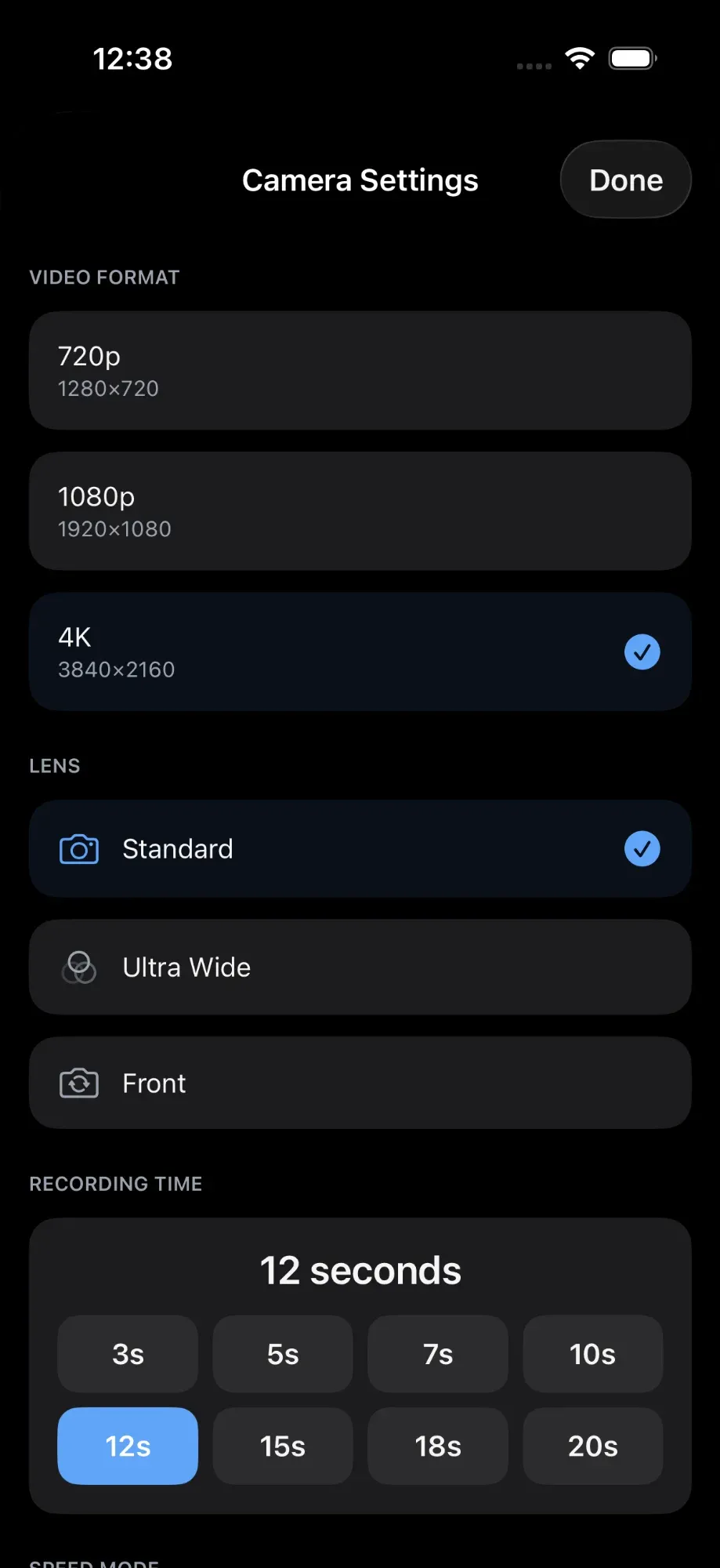
Switch between standard, ultra-wide, and front-facing cameras. Record in 720p, 1080p, or 4K.

📁

Event Management

Create unlimited events, each with their own settings. Browse clips, track usage, export for records.

AirDrop Support

Quick wireless transfer to nearby Apple devices. Alternative to QR when guests prefer it.

🔒

Privacy First

No account required. Videos stored locally or in your own Dropbox. We never see your content.

How it works

Set up in minutes. Run all night without touching the booth.

1

Create an event

Name your event, configure camera settings, upload your branding and overlays.

2

Mount your iPhone

Position on a tripod or 360° platform. Enter recording mode.

3

Connect remote

Scan the QR code with a second iPhone. Control everything wirelessly.

4

Share instantly

Guests scan the QR code after recording to download their clip.

Technical specs

Video Quality
Up to 4K
Clip Duration
3-20 seconds
Minimum iOS
iOS 17.0+
Connection
Peer-to-peer
Cloud Storage
Dropbox
Account Required
None

Frequently asked questions

What is SpinCam 360?

SpinCam 360 is an iPhone app that turns your phone into a professional 360-degree video booth. It includes remote control from a second iPhone, QR code sharing for guests, and built-in video effects like slow-motion and boomerang.

What equipment do I need?

Just an iPhone running iOS 17 or later and a tripod or 360 spinning platform. You can optionally use a second iPhone as a wireless remote control. No expensive booth hardware required.

How much will SpinCam cost?

Pricing will be announced at launch. Join the waitlist to get notified about early-bird and founder pricing when we release.

Which iPhones are compatible?

SpinCam 360 works on any iPhone running iOS 17.0 or later. For best results, we recommend iPhone 13 or newer for superior camera quality and processing power.

Can I use SpinCam for commercial events?

Absolutely. SpinCam is built for professional use — weddings, corporate events, brand activations, and photo booth businesses. You can add custom branding, logos, and overlays to every clip.

How do guests get their videos?

After each recording, a QR code is displayed on screen. Guests scan it with their phone camera and download the video instantly — no app needed, no waiting for emails.

Coming Soon

Be first to know when we launch

Join the waitlist for early access and exclusive launch pricing.

We'll only email you about SpinCam. No spam, ever.

No account required
Your data, your control
No tracking or analytics