HomeServices
Website + CRM builds
Website + CRM builds that keep every enquiry moving.
For service businesses where a form submission turns into a quote, booking, deposit, invoice, payment and follow-up, without someone rebuilding the trail by hand.
The real decision
The problem isn't the form. It's what happens after the form.
Most service businesses already have the ingredients: a website, an inbox, a spreadsheet, a payment link, an invoice tool, a calendar and a few trusted habits. The leak is the handoff between them.
Keep patching tools together.
The website sends an email. The quote lives in a document. The deposit link is in another tab and the invoice sits somewhere else. Everyone is busy, so follow-up depends on who remembers.
- Every new enquiry creates another small admin job.
- No single view of who needs a quote, reply or chase.
- Warm leads go quiet without anyone noticing.
Build one connected flow.
The website, CRM, quote flow, invoice status, payment link, reminders and client history are designed as one working path from the start.
- Every lead lands as a usable client record.
- Quotes, invoices and payments keep their context.
- The day is easier to run because the next step is visible.
What changes
Fewer loose ends, not another dashboard.
The features matter because of what they remove: retyping, duplicate notes, missed replies, late quotes, unclear payment status and the low-level worry that something is waiting somewhere.
Enquiries stop being loose emails.
Forms, campaign pages and booking requests create a record with source, service, notes, owner and next action.
The commercial trail stays together.
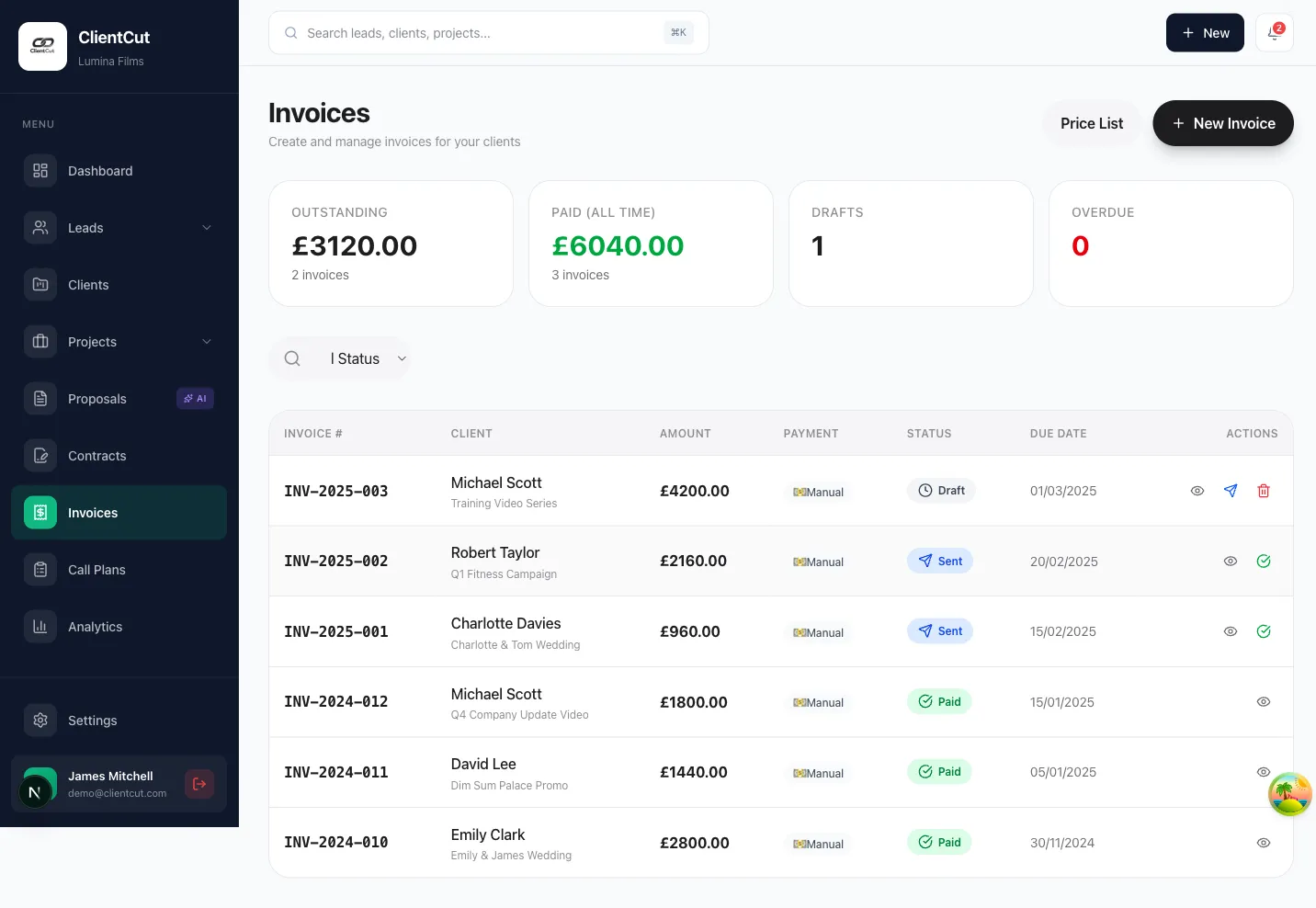
Quotes, deposits, invoices, Stripe links, paid status and payment reminders stay attached to the client.
The system carries the memory load.
Reminders and statuses show who needs a reply, who needs a chase and what's waiting on the customer.
After launch
A calmer day for whoever does the follow-up.
- AM
Start with the work that needs attention
New enquiries, quotes due, unpaid deposits, invoice chases and waiting replies are visible before the day gets noisy.
- 12
Send the next thing without hunting
Client details, notes, status, quote, payment link and next action all sit in the same place.
- PM
End the day knowing what's still open
See what was replied to, what was sent, what was paid and what needs chasing tomorrow.
Best fit
For businesses where a lead becomes a quote, a job and an invoice.
The next growth step usually isn't a nicer page. It's making the customer journey easier to manage after the enquiry arrives.
- 01
Taking enquiries online
Studios, clinics, trades, consultants, creatives and local service teams.
- 02
Sending money admin by hand
Quotes, deposits, invoices, payment links or proposal follow-ups done one at a time.
- 03
Running five separate tools
A website, inbox, spreadsheet, calendar, payment tool and invoice tool that don't talk.
- 04
Owners who want one view
See what needs doing today without asking three people or checking five tabs.
Build call
We start by mapping the lead-to-payment journey.
The first call is a short working session to see where your current process leaks time, leads, payment visibility or follow-up.
- 01
Map what happens today
We trace the path from enquiry to quote, booking, deposit, invoice, payment and follow-up.
- 02
Find the expensive gaps
Where leads slow down, admin gets duplicated or payment status becomes unclear.
- 03
Decide the smallest useful build
You leave knowing whether you need website + CRM, CRM only, or a smaller fix first.
What we build
The website captures demand. The CRM protects the follow-through.
Pages built around real enquiries.
Service pages, landing pages, forms, campaign tracking, booking prompts and conversion paths that ask for the right details.
A working view of every active lead.
Pipeline stages, client records, notes, tasks, reminders and dashboards shaped around how your team sells and serves.
Deposits and invoices stay in context.
Stripe links, deposits, invoice status, reminders and customer history stay attached to the work they belong to.
FAQ
Website + CRM questions.
Is this different from a normal website?
Yes. A normal website usually stops at the enquiry. A website + CRM build connects that enquiry to the quoting, admin, invoicing, payment and follow-up behind it.
Do I need a full CRM?
Not always. Many service businesses need a focused CRM for their real workflow: leads, quotes, bookings, deposits, invoices, reminders and customer history.
Can this replace my current tools?
Sometimes. The goal is to remove the handoffs that waste time, while keeping the tools that still work well for your business.
What happens on the build call?
We map how a customer moves from enquiry to paid invoice, spot the pressure points, and decide whether website + CRM, CRM only, or a smaller improvement is the right next step.
Stop relying on memory to run the follow-up.
Bring the messy version of how customers move today: the form, quote, booking, deposit, invoice, payment and chase. We'll help map the cleaner version.