
The calm way to co-parent.
One shared place for two homes. Pick Up keeps the schedule, messages, and money quietly in sync — so the small stuff stops becoming the 9pm argument.



Loved by co-parenting families across the UK.
April · This week
Shared calendar
Wed 16 · Mum's day 4 events
Dr Patel
Vaccine · Year 6
School pickup
Year 6 — Mrs Lloyd
Football
Heaton Park · Coach Mike
Handover
Mum → Dad
Your draft
"You always forget. Kids are meant to be ready at 6 and you haven't replied."
Flagged · High heat
Sarah paid £24
Maths club · Split 50/50
Friday handover
6:00pm · Mum's week begins →
Co-parenting is hard enough.
The logistics shouldn't make it harder.
The 9pm text argument
A simple question about Friday pickup turns into a forty-message thread neither of you wanted.
The lost receipt
Who paid for the school trip? Nobody remembers. Nobody finds the receipt. Something always slips.
The missed handover
Schedules change. Messages get missed. Your child ends up in the wrong place at the wrong time.
Set up in ten minutes. Used for years.
Invite your co-parent
Send one invite. They accept, and your two homes are linked. Each parent keeps their own login.
Share the schedule
Add your custody pattern once. Pick Up builds the calendar, holidays, and handover reminders.
Coordinate calmly
Message, split expenses, and keep the important stuff in one place — not across four apps.
Everything you need. Nothing that gets in the way.
Real screens from the Pick Up iOS app.
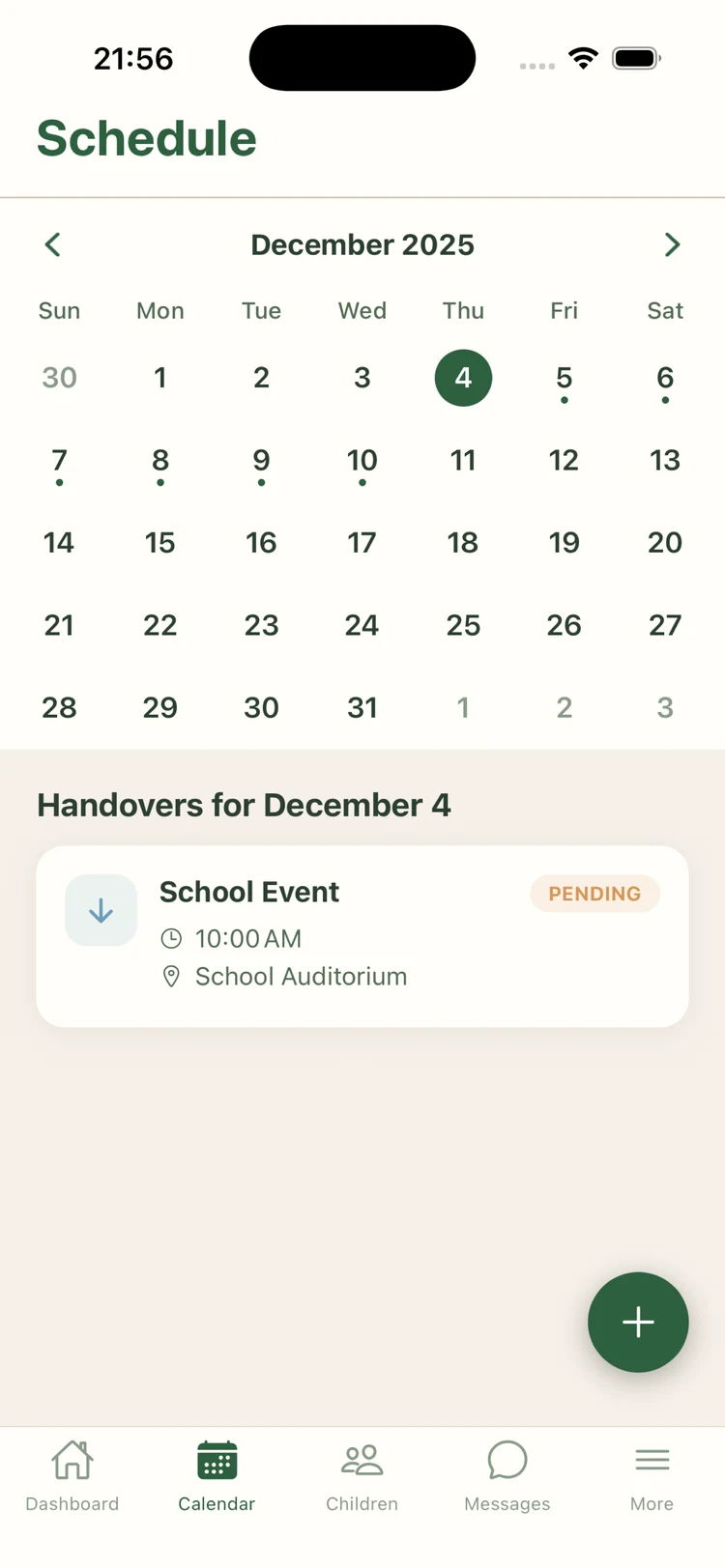
One shared calendar, two homes
Custody patterns, holidays, activities, and handovers — colour-coded, instantly synced, and always the same story on both phones.
- ✓Weekly and fortnightly patterns
- ✓Holiday rotations built in
- ✓iCal and Google Calendar export
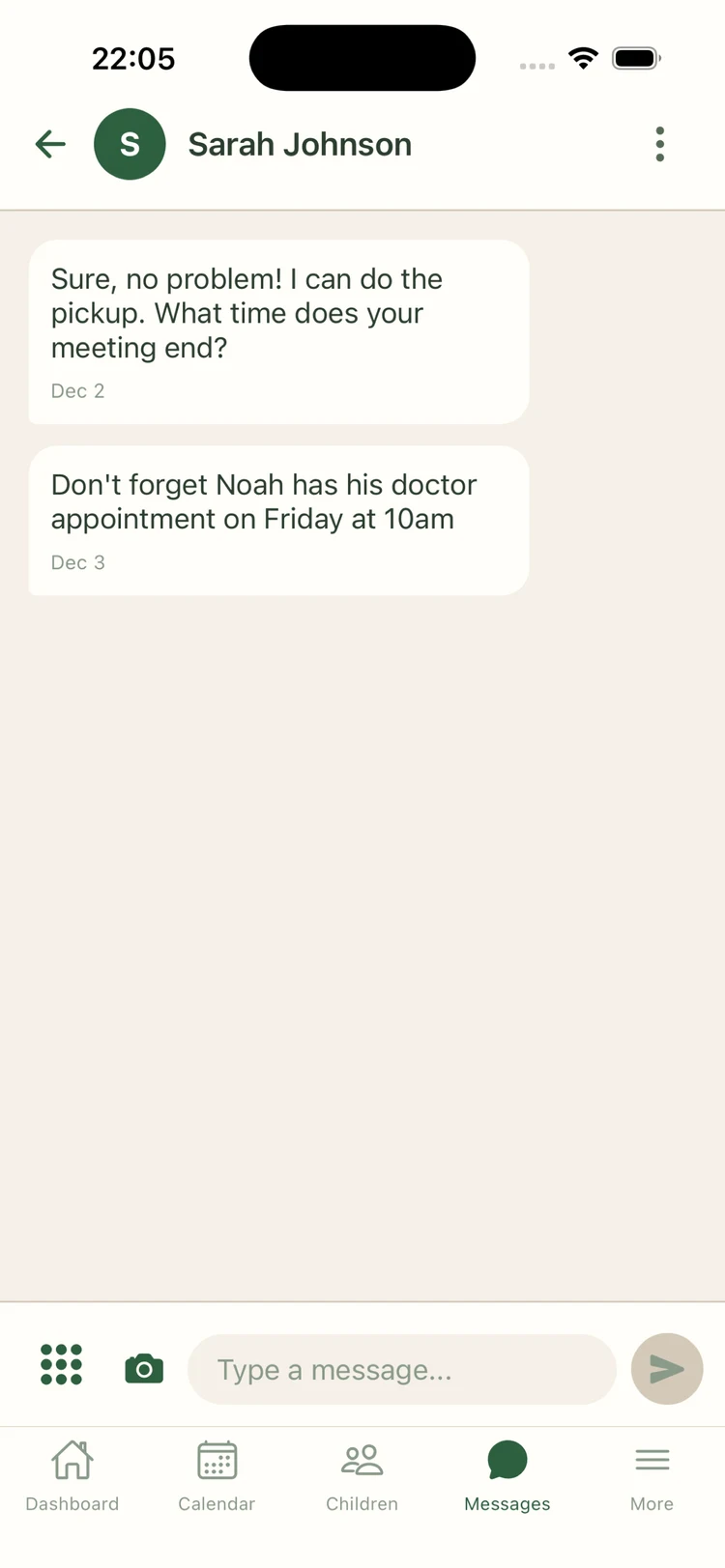
Messages with Tone Assist
Pick Up quietly flags messages that might escalate — and offers a calmer way to say the same thing. Your words, their review, sent when you're ready.
- ✓On-device analysis, never stored
- ✓Time-stamped conversation history
- ✓Export to PDF for your records
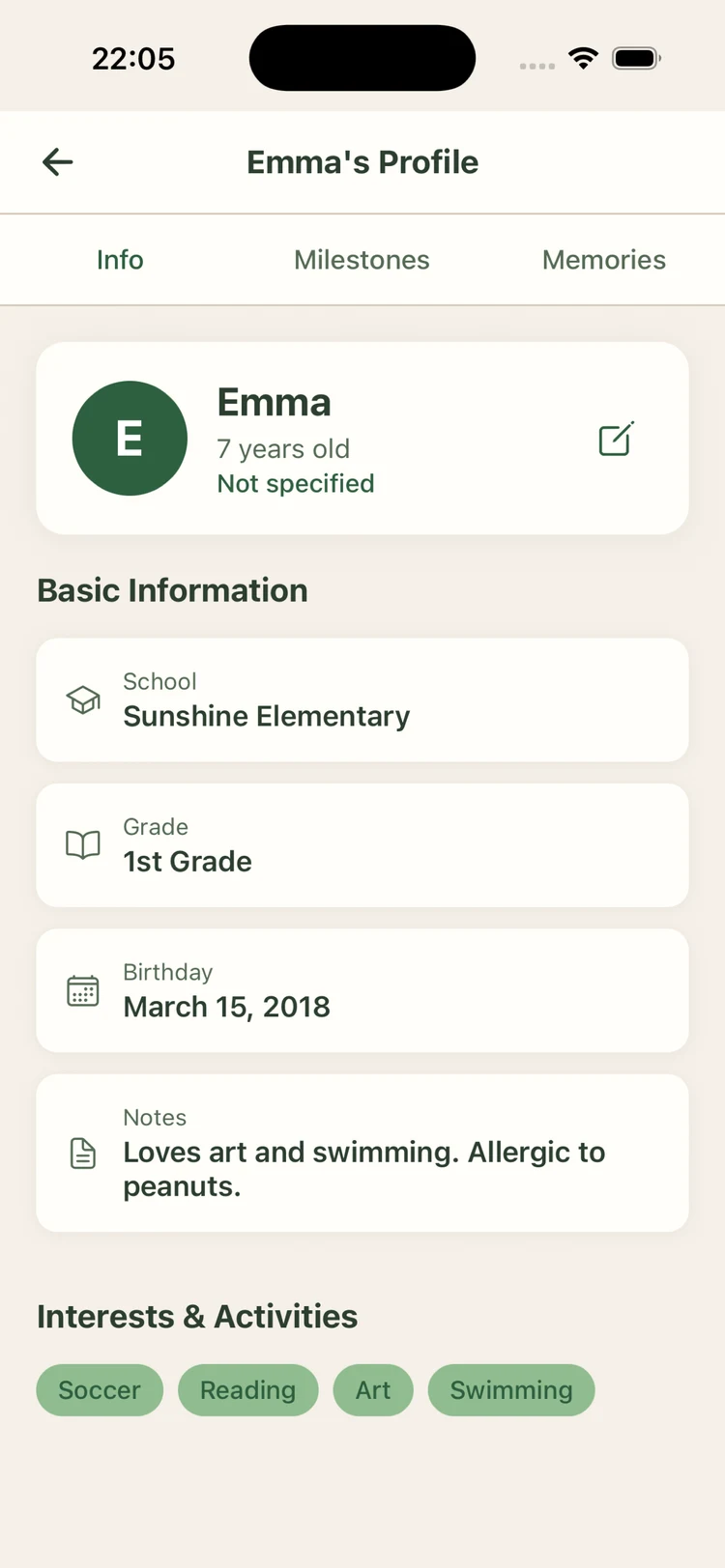
A home for each child
Allergies, school contacts, GP, clothing sizes, emergency info. The stuff you both need and neither of you should have to ask for twice.
- ✓Medical and school details
- ✓Emergency contact list
- ✓Milestones and memories
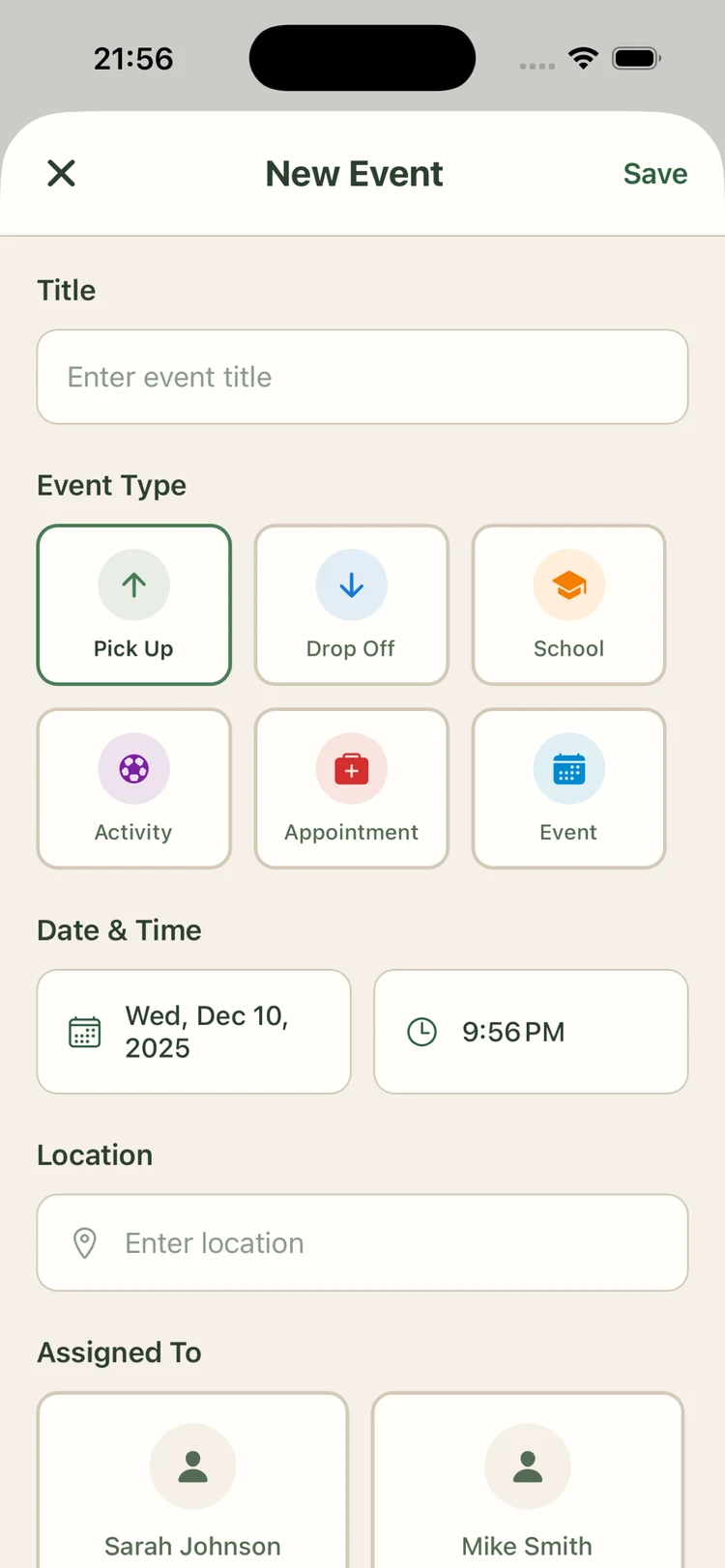
Plan events together
From school plays to the dentist — add an event, pick a handover parent, and Pick Up handles the reminders, location notes, and shared prep list.
- ✓Attach receipts and documents
- ✓Handover parent locked in per event
- ✓Notifications for both homes
A quiet second pair of eyes before you hit send.
The same sentence can land very differently at 9am and 9pm. Tone Assist looks at your message and, when it might escalate, offers a calmer rewrite. Nothing is sent automatically. Nothing leaves your device.
- ✓Runs on-device — your words are never uploaded for analysis.
- ✓You choose whether to accept, edit, or send as-is.
- ✓All messages remain time-stamped and exportable.
Your draft
"You always forget. The kids were meant to be ready at 6 and you haven't even replied. This is exactly why nothing works."
Tone Assist suggestion
"I hadn't heard back about 6pm — just want to double-check the kids will be ready. Can you confirm?"
The one record neither of you can rewrite.
Pick Up was built so the story of your co-parenting stays intact — for both homes, and for the people (solicitors, mediators, courts) who sometimes need to read it.
Tamper-evident timestamps
Every message, event, and expense is written with a server-side timestamp. Edits are kept as new entries — the original version is never overwritten.
Nothing can be deleted from history
Neither parent can quietly remove a message or change a past entry. If something existed, it stays in the record.
Full export in your hand, any time
Export the complete family record as JSON or PDF from Settings. Messages, calendar entries, expenses, decisions, child profiles — everything.
Removed from the family? You still get the export
If you're ever removed from a shared account, Pick Up automatically sends you an export of the shared record. No permission required.
Sample report, anonymised — real exports contain your family's complete record.
Pick Up record
Johnson family · Export ready
Sarah · Message
Sure, no problem! I can do the pickup.
You · Expense
£24.00 · Maths club · Split 50/50
Sarah · Event
Noah · Doctor · Fri 10:00
You · Handover
Confirmed · Mum → Dad · 18:00
No parent can be cut off from their family history.
Both parents have equal access to every calendar entry, message, expense, and child profile. You can export your full family data at any time. If you are ever removed from a shared account, you automatically receive that export — no permission needed, no delay.
This commitment is written into our Terms of Service and our Privacy Policy.
One price per family. Both parents included.
One subscription covers both co-parents. No per-seat pricing, ever.
Monthly
No commitment. Cancel anytime.
- ✓Full access to all features
- ✓Shared calendar for both parents
- ✓Tone-assisted messaging
- ✓Cancel anytime
Annual
Best for families settling in for the long haul.
14-day free trial · No credit card
- ✓Everything in Monthly
- ✓Works out at £8.25 / month
- ✓2 months effectively free
- ✓Cancel anytime in trial
Lifetime
Pay once. Use forever. Our best-ever offer.
Saves £30 vs Annual · pays back in 8 months
- ✓Everything in Annual, forever
- ✓One payment — no renewals
- ✓All future updates included
- ✓Priority support
Prices shown in GBP, inclusive of VAT where applicable. The 14-day free trial is available on the Annual plan only. Lifetime is a limited-time offer while we're growing.
Questions parents ask us most.
Do you offer a free trial?+
Yes — 14 days, on the Annual plan. No credit card required to start. The Monthly plan doesn't include a trial (it's cancel-anytime instead), and Lifetime is a one-time payment.
Can my ex see everything I do in the app?+
Both co-parents see the same shared family data — calendar, messages, expenses, child profiles. Personal account settings and your own device history are private to you. Fair Access is built in and documented in our Terms.
Is Pick Up a legal document?+
No. Pick Up is a coordination tool, not a legal agreement. It cannot override a court order or custody arrangement. What it does provide is a clear, time-stamped record of communication and agreements, which many families find useful alongside their legal paperwork.
Where is my data stored?+
Pick Up runs on Supabase, encrypted in transit (TLS) and at rest. We're UK-based and UK GDPR-compliant. We never sell your data, never show you ads, and never share it for marketing.
Can I export my data?+
Yes. You can export your complete family data — calendar, messages, expenses, child details — as JSON at any time from Settings. If you're ever removed from a shared account, you receive the export automatically.
Can I cancel my subscription?+
Anytime. Monthly cancels from your next billing date. Annual can be cancelled during the trial and won't be charged, or cancelled after to stop future renewals. Lifetime is a one-time payment — there's nothing to cancel.
Does it work on both iPhone and Android?+
Yes — iPhone, Android, and any web browser. One Pick Up account works everywhere.
What if my co-parent won't download the app?+
Pick Up is still useful on your own. You can track your schedule, keep expense records, and store key child information. When your co-parent is ready, invite them and the shared features turn on.
Who built Pick Up?+
H3llo H3llo Ltd — a small UK team of co-parents who needed this to exist and couldn't find it. We build Pick Up full-time and answer support emails ourselves.
Want more? See the Pick Up blog.
Less friction. More time for the kids.
Start free on the Annual plan — 14 days, no credit card. Both parents included on one subscription.